Disclaimer
Informational and entertainment purposes only. Modifying your vehicle's electrical system carries risk — proceed at your own risk. I am not responsible for damage to your car or equipment.
ALSO DO NOT BROADCAST ANALOG SIGNALS! IT IS ILLEGAL IN MANY PLACES AROUND THE WORLD. PLEASE ISOLATE YOUR RF MODULATOR ONE DIRECTION ONLY AND THAT IS TO YOUR VEHICLE'S TV. I AM NOT RESPONSIBLE FOR WHAT HAPPENS IF YOU CHOOSE TO JUST BLAST THE SIGNAL OUT TO THE ENVIRONMENT.
Materials
- RF Modulator
- +12V to +5V USB or RCA power adapter
- RF connectors and Adapters
- Zip ties, double-sided tape, adjustable wrench or ratchet with sockets, screwdriver, panel trim tools
- Digital TV tuner with composite or HDMI output
- 5G filter (tv tuner setup, recommended and optional)
Diagram
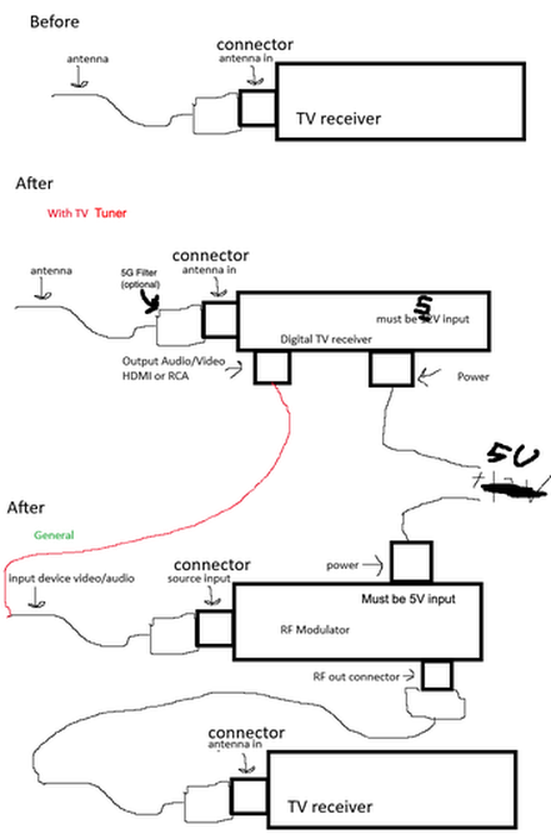
Steps (General)
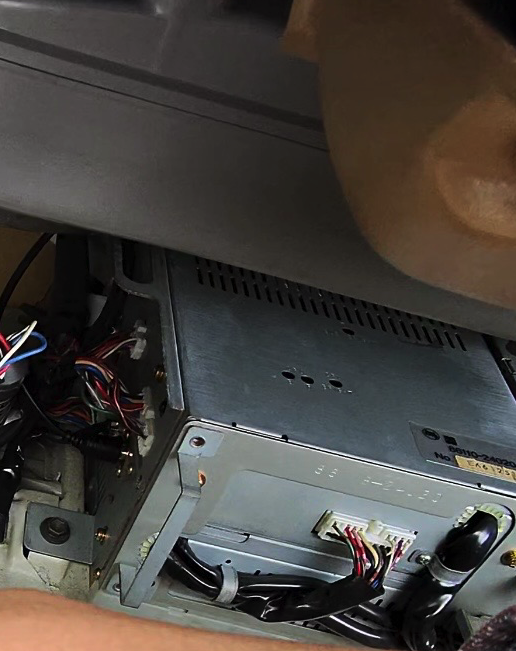
- Identify car antenna leads / receiver
- Z20 Soarer: Refer to image below
- Identify your source of power: Ensure you got a +12V power source for the USB hub. Also, ensure that both the RF receiver you are running and your secondary AV accessory have enough amperage to spare for running.
- Z20 Soarer: if you removed your air suspension, the rear suspension connector has a +12V line. Unconnecting all electrical points of the air suspension allows more load for you to use for the setup. Also, no need to worry of the fuse blows as this would be running off a different fuse line than the common audio and accessory fuse lines.
- Identify your placement: Look around the vicinity of the television receiver module (or head unit), you want to put it near as possible to the receiver to reduce the wire length needed to connect your RF receiver to the tv module/head unit. Reducing wire length reduces attenuation which keeps quality as high as possible.
- Add a powered USB hub: Install a USB hub near the RF receiver and AV accessory by connecting to ground and a +12V line. Make sure it setps down the voltage to +5V
- Remove Antenna In from the receiver: Additionally, if you are not aiming to make it connect to a modern TV tuner, you must reruote it to an antenna combiner that outputs to the antenna in port (this is if you have a single antenna lead to power the antenna and radio in your car and you also want radio to still work. also not covered here) or just cap it off.
- Connect RF receiver out to Antenna In
- This is achieved by making a short RG cable that terminates between an F-Type Male (your typical RF connector) to the average DIN AM/FM Male Connector (this is the radio line connector in what you would see when installing an aftermarket radio). Check materials for the 'SMA Male to Type F Male Coaxial Cable Adapter' and 'SMA Female to DIN Plug AM/FM Male
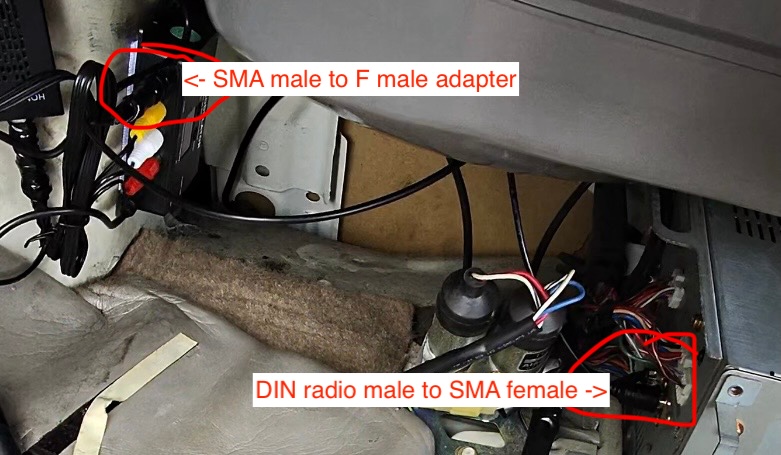
- RF Receiver Setup: Choose the analog encoding your tv takes (PAL or NTSC) and select a channel on the RF receiver. For reference on NTSC conversions, if you are trying to use a JDM car tv, please look at the table in the 'Channel Reference' section
Steps (with TV Tuner)
- Mount TV tuner near RF receiver
- Connect RF receiver to power
- Connect TV tuner to RF receiver via HDMI or RCA
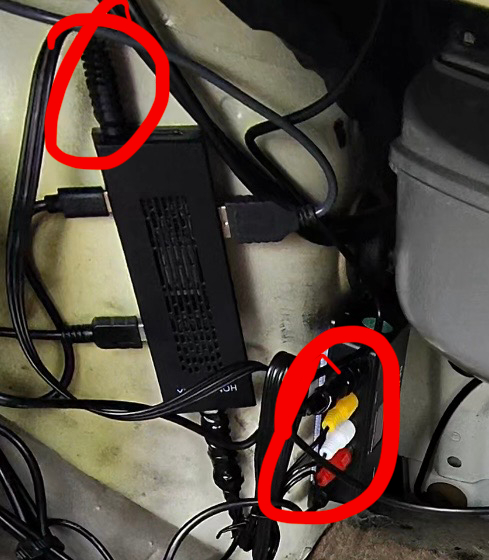
- (Optional) attach the 5G filter to the RF receiver's Antenna port
- Connect TV tuner to Antenna port (or 5G filter ingest port if previous step was done)
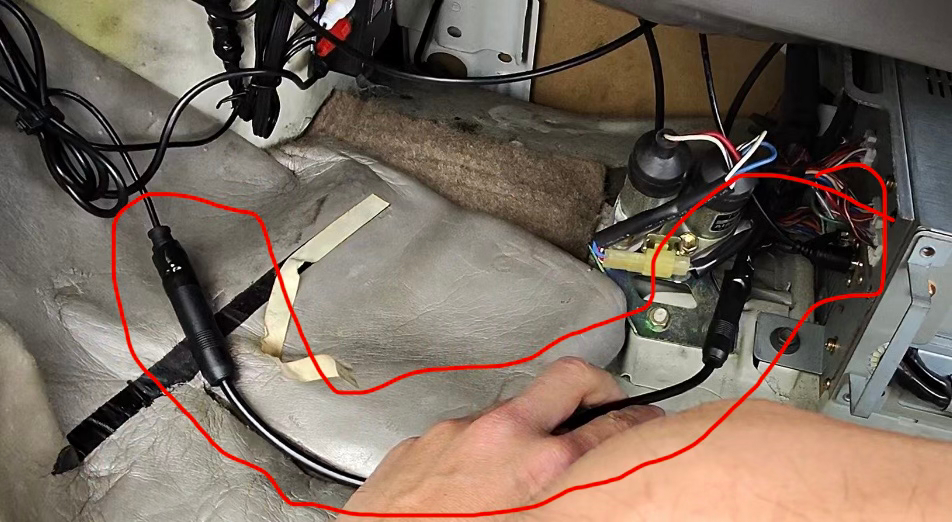
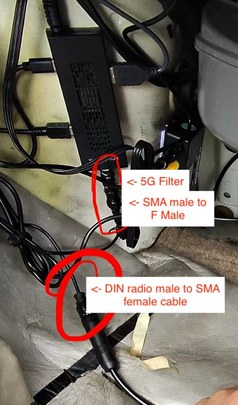
- This is achieved by making a short RG cable that terminates between an F-Type Male (your typical RF connector) to the average DIN AM/FM Female Connector (this is the radio line port on a head unit). Check materials for the 'DIN Female to Female', 'SMA Male to Type F Male Coaxial Cable Adapter' and 'SMA Female to DIN Plug AM/FM Male Adapter' links.
- Connect TV tuner to power
Channel Reference
| NTSC-J | NTSC-M | NTSC-J Match | ||||||
|---|---|---|---|---|---|---|---|---|
| Ch | BW (MHz) | Video (MHz) | Voice (MHz) | Ch | BW (MHz) | Video (MHz) | Voice (MHz) | Match Status |
| 1 | 90-96 | 91.25 | 95.75 | No match | ||||
| 2 | 96-102 | 97.25 | 101.75 | 2 | 54-60 | 55.25 | 59.75 | No match |
| 3 | 102-108 | 103.25 | 107.75 | 3 | 60-66 | 61.25 | 65.75 | No match |
| 4 | 170-176 | 171.25 | 175.75 | 4 | 66-72 | 67.25 | 71.75 | No match |
| 5 | 176-182 | 177.25 | 181.75 | 5 | 76-82 | 77.25 | 81.75 | No match |
| 6 | 182-188 | 183.25 | 187.75 | 6 | 82-88 | 83.25 | 87.75 | No match |
| 7 | 188-194 | 189.25 | 193.75 | 7 | 174-180 | 175.25 | 179.75 | No match |
| 8 | 192-198 | 193.25 | 197.75 | 8 | 180-186 | 181.25 | 185.75 | No match |
| 9 | 198-204 | 199.25 | 203.75 | 9 | 186-192 | 187.25 | 191.75 | No match |
| 10 | 204-210 | 205.25 | 209.75 | 10 | 192-198 | 193.25 | 197.75 | 8 |
| 11 | 210-216 | 211.25 | 215.75 | 11 | 198-204 | 199.25 | 203.75 | 9 |
| 12 | 216-222 | 217.25 | 221.75 | 12 | 204-210 | 205.25 | 209.75 | 10 |
| 13 | 470-476 | 471.25 | 475.75 | 13 | 210-216 | 211.25 | 215.75 | 11 |
| 14 | 476-482 | 477.25 | 481.75 | 14 | 470-476 | 471.25 | 475.75 | 13 |
| 15 | 482-488 | 473.25 | 487.75 | 15 | 476-482 | 477.25 | 481.75 | 14 |
| 16 | 488-494 | 489.25 | 493.75 | 16 | 482-488 | 473.25 | 487.75 | 15 |
| 17 | 494-500 | 495.25 | 499.75 | 17 | 488-494 | 489.25 | 493.75 | 16 |
| 18 | 500-506 | 501.25 | 505.75 | 18 | 494-500 | 495.25 | 499.75 | 17 |
| 19 | 506-512 | 507.25 | 511.75 | 19 | 500-506 | 501.25 | 505.75 | 18 |
| 20 | 512-518 | 513.25 | 517.75 | 20 | 506-512 | 507.25 | 511.75 | 19 |
| 21 | 518-524 | 519.25 | 523.75 | 21 | 512-518 | 513.25 | 517.75 | 20 |
| 22 | 524-530 | 523.25 | 529.75 | 22 | 518-524 | 519.25 | 523.75 | 21 |
| 23 | 530-536 | 531.25 | 535.75 | 23 | 524-530 | 523.25 | 529.75 | 22 |
| 24 | 536-542 | 537.25 | 541.75 | 24 | 530-536 | 531.25 | 535.75 | 23 |
| 25 | 542-548 | 543.25 | 547.75 | 25 | 536-542 | 537.25 | 541.75 | 24 |
| 26 | 548-554 | 549.25 | 553.75 | 26 | 542-548 | 543.25 | 547.75 | 25 |
| 27 | 554-560 | 555.25 | 599.75 | 27 | 548-554 | 549.25 | 553.75 | 26 |
| 28 | 560-566 | 561.25 | 565.75 | 28 | 554-560 | 555.25 | 599.75 | 27 |
| 29 | 566-572 | 567.25 | 571.75 | 29 | 560-566 | 561.25 | 565.75 | 28 |
| 30 | 572-578 | 573.25 | 577.75 | 30 | 566-572 | 567.25 | 571.75 | 29 |
| 31 | 578-584 | 579.25 | 583.75 | 31 | 572-578 | 573.25 | 577.75 | 30 |
| 32 | 584-590 | 585.25 | 589.75 | 32 | 578-584 | 579.25 | 583.75 | 31 |
| 33 | 590-596 | 591.25 | 595.75 | 33 | 584-590 | 585.25 | 589.75 | 32 |
| 34 | 596-602 | 597.75 | 601.75 | 34 | 590-596 | 591.25 | 595.75 | 33 |
| 35 | 602-608 | 603.25 | 607.75 | 35 | 596-602 | 597.75 | 601.75 | 34 |
| 36 | 608-614 | 609.25 | 613.75 | 36 | 602-608 | 603.25 | 607.75 | 35 |
| 37 | 614-620 | 615.25 | 619.75 | 37 | 608-614 | 609.25 | 613.75 | 36 |
| 38 | 620-626 | 621.25 | 625.75 | 38 | 614-620 | 615.25 | 619.75 | 37 |
| 39 | 626-632 | 627.25 | 631.75 | 39 | 620-626 | 621.25 | 625.75 | 38 |
| 40 | 632-638 | 633.25 | 637.75 | 40 | 626-632 | 627.25 | 631.75 | 39 |
| 41 | 638-644 | 639.25 | 643.75 | 41 | 632-638 | 633.25 | 637.75 | 40 |
| 42 | 644-650 | 645.25 | 649.75 | 42 | 638-644 | 639.25 | 643.75 | 41 |
| 43 | 650-656 | 651.25 | 655.75 | 43 | 644-650 | 645.25 | 649.75 | 42 |
| 44 | 656-662 | 657.25 | 661.75 | 44 | 650-656 | 651.25 | 655.75 | 43 |
| 45 | 662-668 | 663.25 | 667.75 | 45 | 656-662 | 657.25 | 661.75 | 44 |
| 46 | 668-674 | 669.25 | 673.75 | 46 | 662-668 | 663.25 | 667.75 | 45 |
| 47 | 674-680 | 675.25 | 679.75 | 47 | 668-674 | 669.25 | 673.75 | 46 |
| 48 | 680-686 | 681.25 | 685.75 | 48 | 674-680 | 675.25 | 679.75 | 47 |
| 49 | 686-692 | 687.25 | 691.75 | 49 | 680-686 | 681.25 | 685.75 | 48 |
| 50 | 692-698 | 693.25 | 697.75 | 50 | 686-692 | 687.25 | 691.75 | 49 |
| 51 | 698-704 | 699.25 | 703.75 | 51 | 692-698 | 693.25 | 697.75 | 50 |
| 52 | 704-710 | 705.25 | 709.75 | 52 | 698-704 | 699.25 | 703.75 | 51 |
| 53 | 710-716 | 711.25 | 715.75 | 53 | 704-710 | 705.25 | 709.75 | 52 |
| 54 | 716-722 | 717.25 | 721.75 | 54 | 710-716 | 711.25 | 715.75 | 53 |
| 55 | 722-728 | 723.25 | 727.75 | 55 | 716-722 | 717.25 | 721.75 | 54 |
| 56 | 728-734 | 729.25 | 733.75 | 56 | 722-728 | 723.25 | 727.75 | 55 |
| 57 | 734-740 | 735.25 | 739.75 | 57 | 728-734 | 729.25 | 733.75 | 56 |
| 58 | 740-746 | 741.25 | 745.75 | 58 | 734-740 | 735.25 | 739.75 | 57 |
| 59 | 746-752 | 747.25 | 751.75 | 59 | 740-746 | 741.25 | 745.75 | 58 |
| 60 | 752-758 | 753.25 | 757.75 | 60 | 746-752 | 747.25 | 751.75 | 59 |
| 61 | 758-764 | 759.25 | 763.75 | 61 | 752-758 | 753.25 | 757.75 | 60 |
| 62 | 764-770 | 765.25 | 769.75 | 62 | 758-764 | 759.25 | 763.75 | 61 |
| 63 | 764-770 | 765.25 | 769.75 | 62 | ||||
| 64 | 770-776 | 771.25 | 775.75 | No match | ||||
| 65 | 776-782 | 777.25 | 781.75 | No match | ||||
| 66 | 782-788 | 783.25 | 787.75 | No match | ||||
| 67 | 788-794 | 789.25 | 793.75 | No match | ||||
| 68 | 794-800 | 795.25 | 799.75 | No match | ||||
| 69 | 800-806 | 801.25 | 805.75 | No match | ||||
| 70 | 806-812 | 807.25 | 811.75 | No match | ||||
| 71 | 812-818 | 813.25 | 817.75 | No match | ||||
| 72 | 818-824 | 819.25 | 823.75 | No match | ||||
| 73 | 824-830 | 825.25 | 829.75 | No match | ||||
| 74 | 830-836 | 831.25 | 835.75 | No match | ||||
| 75 | 836-842 | 837.25 | 841.75 | No match | ||||
| 76 | 842-848 | 843.25 | 847.75 | No match | ||||
| 77 | 848-854 | 849.25 | 853.75 | No match | ||||
| 78 | 854-860 | 855.25 | 859.75 | No match | ||||
| 79 | 860-866 | 861.25 | 865.75 | No match | ||||
| 80 | 866-872 | 867.25 | 871.75 | No match | ||||
| 81 | 872-878 | 873.25 | 877.75 | No match | ||||
| 82 | 878-884 | 879.25 | 883.75 | No match | ||||
| 83 | 884-890 | 885.25 | 899.75 | No match | ||||
Resources